
Your own construction site app for clock-ins, photos, checklists and weekly reports
Swap paper timesheets, WhatsApp photo threads and end-of-week report writing for one simple app your operatives use on their phones. Built around how your firm works, branded as your own, with a free demo first.
The problem with paper and group chats on site
On most small and mid-sized UK sites, the information is all there, but it's scattered. Hours are on paper timesheets or in someone's head. Progress photos are buried in a WhatsApp group with hundreds of messages. Checklists are signed on a clipboard in the cabin, and the weekly report gets pieced together on a Friday afternoon from all of the above.
It's slow, things get lost, and when a client, main contractor or inspector asks for evidence, finding it takes far longer than it should. A site app puts it all in one place, captured as the work happens, by the people doing it.
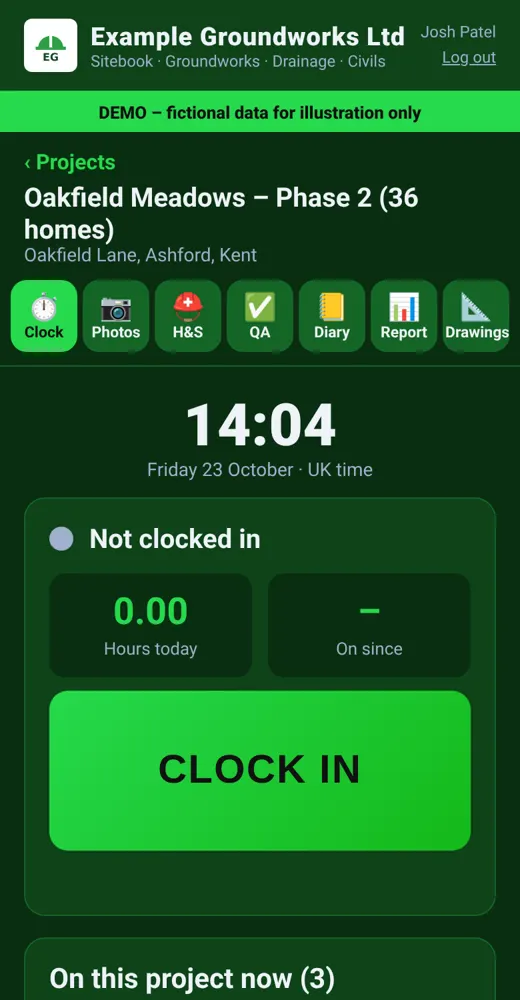
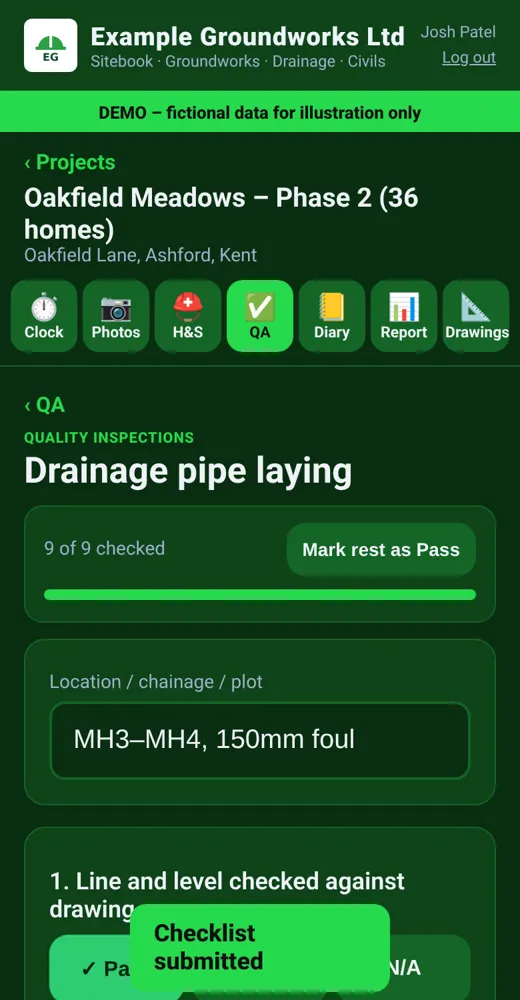
Screens are from our own example demo, using a made-up business and sample data. Your version would carry your own name, logo and colours.
What the app does
- Clock in and out. Operatives clock in on their phone when they arrive and clock out when they leave, with location recorded so you know it happened on site. Managers can see who's on which project right now and their hours for the week.
- Site photos, organised. Photos are taken in the app and saved against the right project, date and area, with a note if needed. No more scrolling through group chats.
- H&S checklists. Daily or weekly health and safety checks, set up from your own forms, completed on the phone with a comment or photo where something needs attention.
- QA and inspection checklists. Step-by-step quality checks for things like drainage, kerbing or brickwork, with pass, fail and N/A, plus location or chainage details.
- Site diary app. Quick daily notes on weather, deliveries, visitors, delays and instructions, which are the details that matter later.
- Weekly site report PDF. One tap pulls the week's hours, photos, checklists and diary notes into a tidy, branded PDF you can send to a client or keep on file.
- Drawings and documents. Keep the latest drawings and key documents where the team can reach them on site.
Built for operatives, not office staff
If an app is fiddly, it won't get used on site. That's why the screens are big, simple and readable in daylight, with large buttons that work with work gloves or cold hands. Operatives sign in with a short PIN rather than a password, and they only see what they need: their projects, their clock-in and their checklists.
Managers get the bigger picture: a live board of who's on site, weekly hours by person and project, checklist history, and reports ready to send. It doubles as a timesheet app for construction teams: office staff can export hours for payroll instead of re-typing paper timesheets.
Your checklists, your paperwork
Every firm has its own forms, and a generic app rarely matches them. We build the checklists around the paperwork you already use, such as your daily site checks, plant checks, permit or inspection forms and QA sign-offs, so the app reflects how your firm actually works. It supports good record-keeping alongside your existing health and safety arrangements; it doesn't replace your competent person or your own procedures.
Groundworks, civils, builders and contractors
The example demo is set up for a groundworks and drainage contractor, but the same building blocks suit general builders, civil engineering firms, roofers, landscapers and specialist subcontractors. Running several projects at once? Each project keeps its own photos, checklists and diary, and reports can be produced per project.
We'll build you a free demo with your firm's name, logo and colours and a sample project, so you can show it to your site managers before you decide.
Frequently asked questions
Does it work without signal on site?
Site signal can be patchy, so we design for that. Tell us about your sites and we'll explain how the app handles poor signal for the features you need before you commit.
Do operatives need a smartphone?
Each person clocking in needs a phone with a web browser. There's nothing to install from an app store. Alternatively, a supervisor can clock a gang in from one device.
Can we use our own H&S and QA forms?
Yes. We build the checklists from the forms you already use, and they can be changed later as your procedures change.
What goes in the weekly site report?
Typically hours on site, photos, completed checklists and diary notes for the week, as a branded PDF. We can adjust what's included to match what your clients ask for.
Can we export hours for payroll?
Yes. Hours can be exported as a spreadsheet so the office doesn't have to re-type timesheets.
Can we try it first?
Yes. We'll build a free demo with your branding and a sample project. There's also a short video walkthrough of our example demo on our home page.
Related pages
Get a free quote & demo
Tell us about your business and what you need. We work with small businesses and trades UK wide, and we'll come back with a clear fixed quote and, where it makes sense, a free working demo with your own name, logo and colours.